Microsoft describes agents as: “Specialized AI tools built to handle specific processes or solve business challenges. They can respond to and resolve inquiries in real time or operate independently based on predefined goals.” Think of an Agent as a fancy Excel Macro. Pre-created for reuse. Copilot is your personal assistant. Agents are the specialists you call in to do the actual jobs.
What Are Copilot Agents?
- Agents are AI-driven digital coworkers that automate and execute business processes on behalf of individuals, teams, or the entire organization.
- They can be simple (instruction‑based) or advanced (autonomous, multi-step).
Why Agents Exist: The Evolution of Copilot
Microsoft has evolved from:
- Copilot (responds to prompts) →
- Copilot Chat (context-aware) →
- Copilot Agents (action-taking, automated, persistent)
Agents solve the problem of repetitive digital work and fragmented apps slowing employees down.
- Copilot = “Ask me anything.”
- Agent = “I know how to do this specific thing — automatically.”
What Copilot Agents Can Do:
Automate workflows – Execute multi-step tasks using Power Automate connectors.
Take action, not just respond – Examples:
- Create tasks
- Update records
- Prepare documents
- Analyze data
- Fetch and interpret policies or documents
Work with enterprise data securely – Inherited Microsoft 365 permissions, sensitivity labels, and DLP controls.
Act across apps – Agents can live inside:
- Teams
- Outlook
- Word / Excel
- Copilot app canvas
Support both licensed Copilot users and free Copilot Chat users
Types of AI Agents:
Prompt-and-response agents
Prompt-and-response agents are AI tools designed to perform specific tasks based on a user’s input or “prompt.” These agents process the given input and generate a corresponding response, facilitating a back-and-forth exchange with the user. They can be used in various contexts, such as chatbots, virtual assistants, or specialized AI systems for business applications.
Task agents
Cognitive agents are designed to mimic human thought processes. They use machine learning and natural language processing to understand, learn, and adapt to user behavior over time, which makes them useful for analyzing historical data and taking action based on their learnings.
Autonomous agents
Autonomous agents have their own distinct roles and capabilities. While they operate independently as an entity, they’re also able to interact and collaborate with other agents to solve complex problems, optimize larger processes, or achieve a specific goal.
Extract from Copilot and AI Agents Site: Read more here…
7 Steps to get started with Agents:
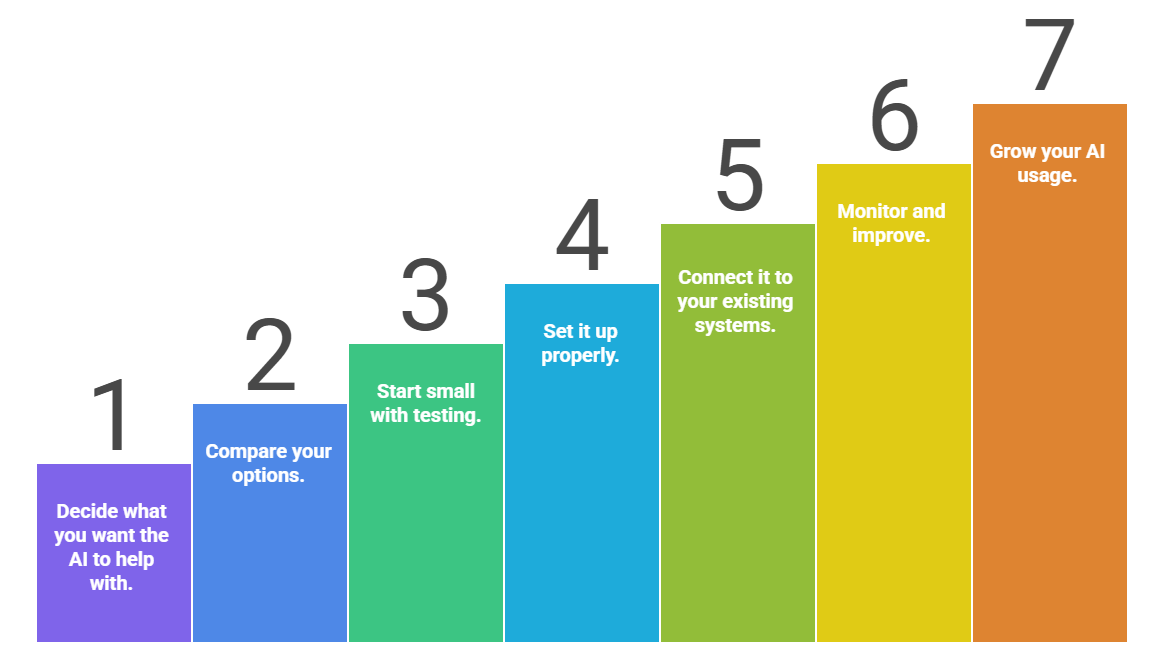
1. Decide what you want the AI to help with.
Think about the tasks in your business that take time or could run more smoothly.
Do you want faster customer support? Better insights from data? Less manual admin work?
Pick the specific tasks where AI could make your life easier.
2. Compare your options.
Look at different AI tools and choose one that:
3. Start small with testing.
Before rolling it out to everyone, let a small group try it first.
This helps you see how well it works, what needs fixing, and what users struggle with.
4. Set it up properly.
Customize the AI so it fits your business. This could include:
- Setting rules and permissions
- Creating workflows
- Teaching it from your existing data so it becomes more accurate
Make sure you follow privacy and data protection rules during setup.
5. Connect it to your existing systems.
Integrate the AI into the tools you already use, like email, CRM, helpdesk, or Teams.
Test everything to make sure it runs smoothly without breaking existing processes.
6. Monitor and improve.
Once it’s running, measure how well the AI is helping.
Track things like:
- Speed
- Quality
- Accuracy
- User satisfaction
Then tweak and improve it over time.
7. Grow your AI usage.
If the first use case works well, expand to more teams or more tasks.
Make sure your staff get the training they need so everyone feels confident using AI.
In the next article I’ll share tips on writing great prompts and creating your first agent.
Resources:
- Copilot Prompt Gallery
- Microsoft 365 Copilot help & learning
- Accelerate your AI journey with our Copilot Success Kit
- Microsoft 365 Copilot Hub
- Copilot Success Kit
Other Copilot related blogs I’ve written:
- From Burnout to Balance: My Journey with Microsoft Copilot
- Prompt Like a Pro: Exploring the Purpose of the Copilot Prompt Gallery
- The Prompt Gallery Playbook: Level Up Your Copilot Skills
- Microsoft 365 Copilot Help & Learning Portal
“Build confidence, boost creativity, and let Copilot do the heavy lifting. Your journey from beginner to brilliant starts with one good prompt.”
Contact me:
Do you need help with your #Microsoft365 #Copilot journey? Contact me.
Please DO NOT contact me to publish blogs on your behalf, advertise on my site, endorse your product or solve a problem you have (that could have been solved by posting on an online forum). As part of the #Micosoft365 #Copilot #Community, we work really hard on content and support that we give back to you, for free – because we really do care. You are always welcome to leave (relevant) comments on my blogs / videos, and I’ll respond, as this way, others also get value from it.
Stay awesome, keep learning, help others.

 Tracy van der Schyff
Leave a Reply