Most people think that using Copilot requires technical skills, but the truth is far simpler: you don’t need to be an AI expert: you just need to know how to ask. Writing good prompts isn’t about fancy jargon or complicated instructions; it’s about being clear about what you want and giving Copilot the right clues to help you get there.
In this blog, we’ll break down prompting in a way that makes sense for everyday users, whether you’re writing emails, improving documents, summarizing meetings, or creating presentations. No buzzwords, no overwhelm. Just practical tips, real examples, and easy ways to get better results from Copilot in your daily work.
Think of this as your guide to “talking” to Copilot so it can understand you, support you, and help you work smarter, not harder. Let’s make prompting simple, approachable, and surprisingly fun.

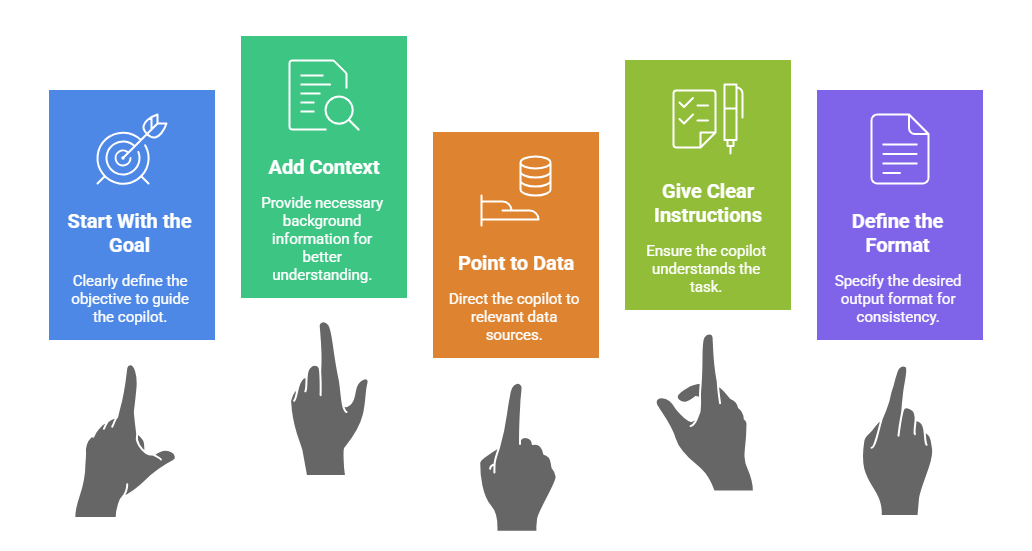
Your Prompt Formula
Start With the Goal
Copilot works best when it knows exactly what you want.
DON’T THIS: “Help me with this.”
DO THIS: “Create a 150‑word update for executives summarizing this project.”
Be explicit about the outcome you expect.
Add Context (The Secret Ingredient)
AI isn’t in your head — you must give it the world around the task:
- Who is the audience?
- What is the purpose?
- What matters most — clarity, speed, tone, format?
- Are there constraints?
Strong context = strong results.
Point Copilot to the Right Data
Tell Copilot exactly what to use (and what to ignore):
- Documents
- Emails
- Meeting transcripts
- Excel files
- Links
- Notes
This helps Copilot stay precise and reduces the risk of incorrect or invented information.
Give Clear Instructions
Tell Copilot how to do the work:
- Tone (formal, conversational, friendly, technical)
- Length
- Structure
- Style
- Level of detail
You’re not being “bossy.” You’re being effective.
Define the Format
Every prompt should finish with the format you want:
- Summary
- Table
- Script
- Blog
- Slide deck
- Action plan
Format gives Copilot boundaries, and boundaries give clarity.
Prompt example: Before & After
🟥 Vague:
“Create a presentation about our intranet.”
🟩 Effective:
“Create a 6‑slide deck explaining our new SharePoint Online intranet for non‑technical staff.
Use the attached project brief.
Tone: simple and benefits-focused.
Include: purpose, key features, what’s changing, and how employees will find content.”
A few points to keep in mind (excerpt from Microsoft)
- Review and verify responses you get from Copilot. Copilot is built upon Large Language Models (LLMs), advanced tools designed to predict and generate text. Occasionally, Copilot responses can include incorrect content, due to the vast and diverse nature of LLMs. Evaluate Copilot’s responses and cross-reference with trusted sources when needed.
- Using the same prompt multiple times can result in different responses. LLMs are built upon neural network, which introduces some randomness. Even with the same input prompt, most likely, you will get slightly different results each time.
- Use Copilot in a respectful, ethical, and lawful manner. Avoid using Copilot for any purpose that might cause harm to yourself or others. See our responsible AI (Artificial Intelligence) principles and standards.
- Read more…
In the next article I’ll share 20 practical things Copilot can already do for you – every day – to save time.
Resources:
- Learn about Copilot prompts
- Edit a Copilot prompt to make it your own
- Cooking up a great prompt: Getting the most from Copilot
- Share your best prompts
- Copilot Prompt Gallery
- Microsoft 365 Copilot help & learning
- Accelerate your AI journey with our Copilot Success Kit
- Microsoft 365 Copilot Hub
- Copilot Success Kit
Other Copilot related blogs I’ve written:
- From Burnout to Balance: My Journey with Microsoft Copilot
- Prompt Like a Pro: Exploring the Purpose of the Copilot Prompt Gallery
- The Prompt Gallery Playbook: Level Up Your Copilot Skills
- Microsoft 365 Copilot Help & Learning Portal
- Beyond Chat: How Copilot Agents Are Transforming Work in 2026
“Build confidence, boost creativity, and let Copilot do the heavy lifting. Your journey from beginner to brilliant starts with one good prompt.”
Contact me:
Do you need help with your #Microsoft365 #Copilot journey? Contact me.
Please DO NOT contact me to publish blogs on your behalf, advertise on my site, endorse your product or solve a problem you have (that could have been solved by posting on an online forum). As part of the #Micosoft365 #Copilot #Community, we work really hard on content and support that we give back to you, for free – because we really do care. You are always welcome to leave (relevant) comments on my blogs / videos, and I’ll respond, as this way, others also get value from it.
Stay awesome, keep learning, help others.

 Tracy van der Schyff
Leave a Reply