Choosing the right Microsoft Copilot license can feel a bit like navigating a maze, filled with similar‑sounding options, hidden feature differences, and pricing that varies depending on your needs. Whether you’re considering Copilot Chat for lightweight assistance, Microsoft 365 Copilot Business for everyday productivity, or the full Enterprise and Copilot Studio stack for advanced automation and customization, understanding what each license includes (and what it doesn’t!) is essential.
In this guide, we’ll break down the licensing options, key features, costs, limitations, and the “gotchas” every organization should know before making a decision, so you can confidently choose the Copilot path that delivers the most value with no surprises.

In a previous blog, I shared 20 time-saving things you can do with Copilot. Of these 20, 8 was not possible with the standard Copilot Chat (included in your Microsoft 365 account). It’s advisable to understand the limitations. Saving Time Daily: 20 Things Copilot Can Already Do for You.
Copilots Available:
Technically there’s 4 Copilot options available.
- Free Commercial Copilot
- Copilot Chat (as part of Microsoft 365)
- Microsoft 365 Copilot for Business
- Microsoft 365 Copilot for Enterprise
Pros, Risks, and Cons:
1) Free Commercial Copilot
- Pros: Free; fast for web research, writing, brainstorming.
- Risks/Cons: Not connected to your work data; don’t paste confidential info; limited value for internal tasks.
2) Copilot Chat (as part of Microsoft 365)
- Pros: Free for tenants; enterprise data protection; supports file upload and pay‑as‑you‑go agents; easy way to start safely.
- Risks/Cons: Doesn’t read your emails/SharePoint by default; web‑grounded answers may lack your company context; service capacity limits can affect speed/availability.
3) Microsoft 365 Copilot for Business
- Pros: Deeply integrated in Office apps; understands work context (emails, files, meetings); big time savings for everyday tasks.
- Risks/Cons: Paid per user; requires the right Business base license; adoption depends on data hygiene/permissions (oversharing or messy SharePoint can affect results).
4) Microsoft 365 Copilot for Enterprise
- Pros: Everything in Business plus stronger governance options via E3/E5 (labels, DLP, auto‑labeling, audit), and enterprise‑scale admin controls
- Risks/Cons: Highest total cost; you’ll need clear policies and good data lifecycle management to get reliable, safe outcomes
Do you know which license you have?
In my blogs, I will be focusing on the Microsoft 365 Copilot for Business subscription.
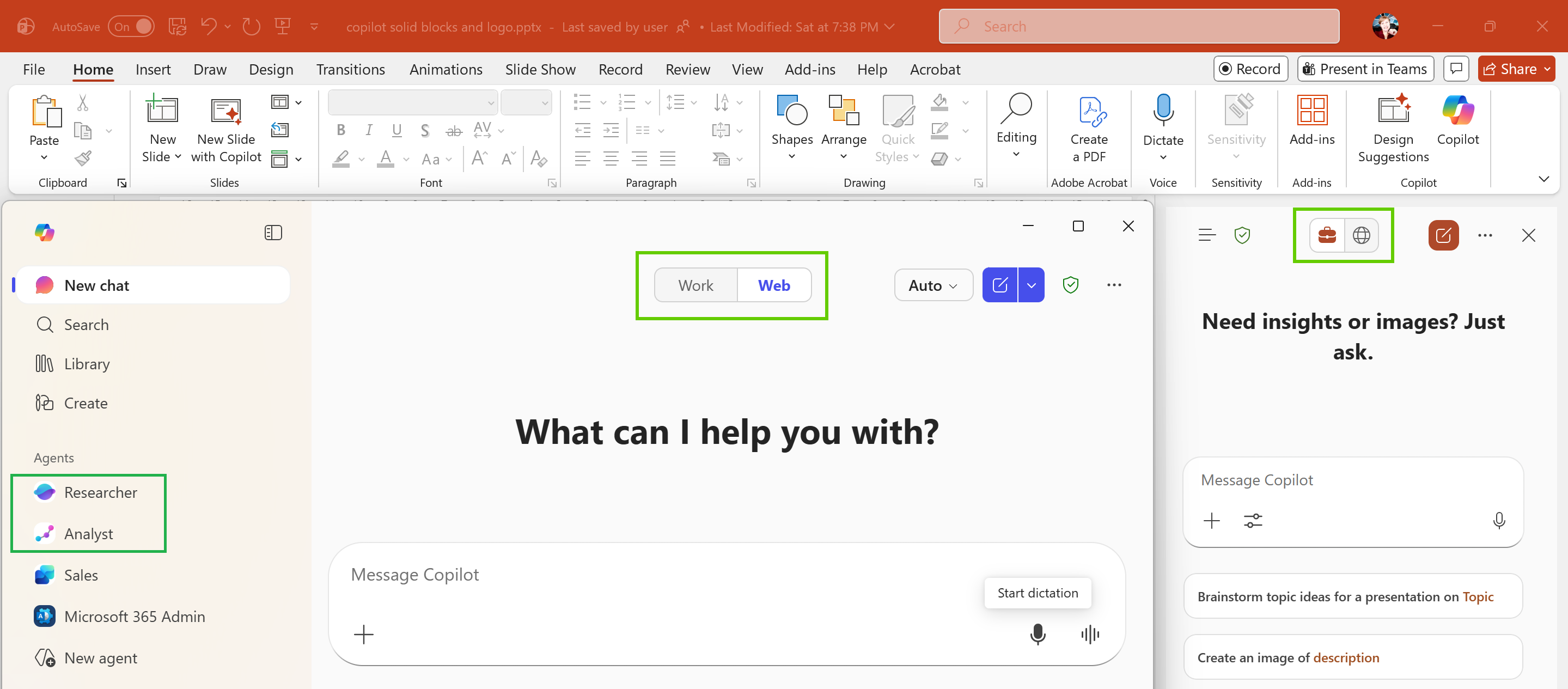
When logged into the Microsoft 365 portal, it automatically opens up on the Copilot page. If you have the add-on license, you will notice the “Researcher” and “Analyst” under the Agents on the left. At the top you will also notice the “Work” and “Web” toggle buttons for switching between searching your company content vs the broader web. If you do not notice these, you have the standard Copilot Chat which is included in your Microsoft 365 subscription. You will notice this inside your Office applications as well (PowerPoint in the background for illustration).
Note: Microsoft 365 Copilot only has access to the data you already have permission to see inside your organization. It does not gain any elevated permissions, and it does not access data you’re not allowed to view. See my next blog where I share more information regarding “oversharing” / “accidental discovery” and the impact on Copilot.
Comparison:
Below I’ve compiled a table that looks at the 4 main Copilot options (free commercial Copilot excluded). Refer to the Copilot Plans and Pricing site to confirm latest pricing.
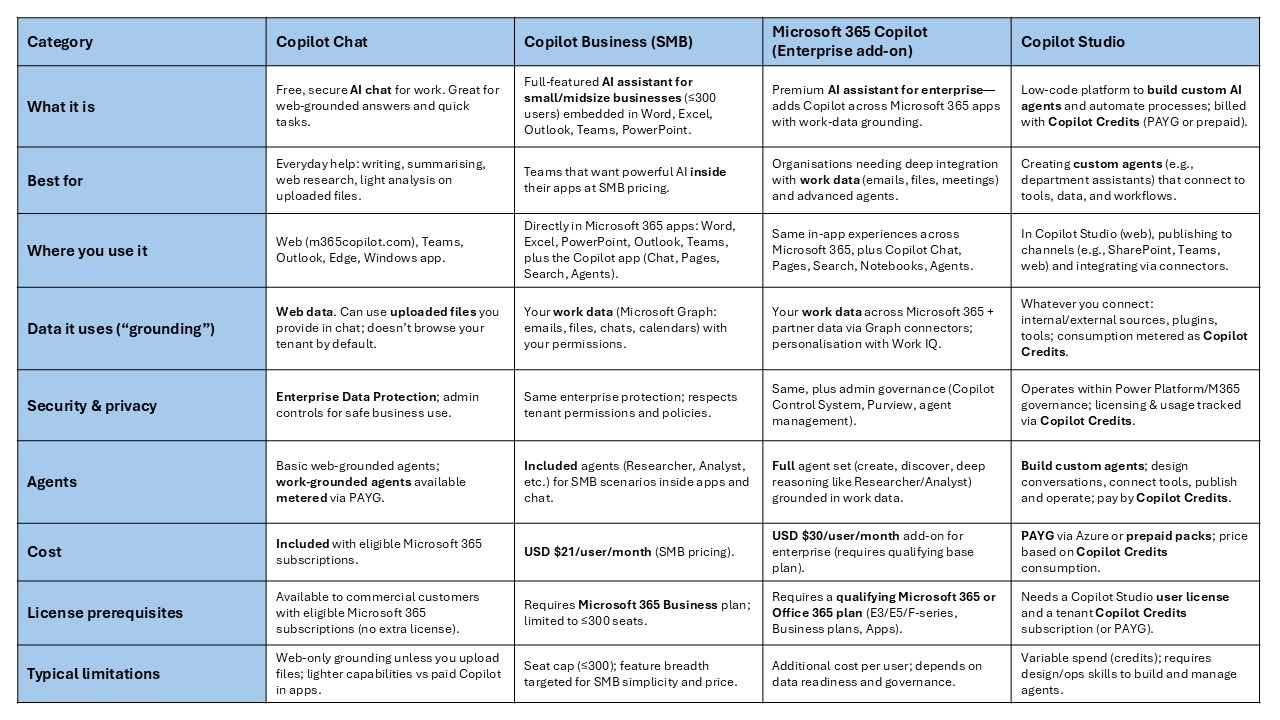
I hope this gives you a clearer picture of the different Copilot options and which one is the best fit for your needs.
“Copilot will not see anything you don’t already have permission to access — but if you can see too much, Copilot will surface too much.” This aligns with Microsoft’s repeated warning that AI amplifies oversharing. In the next blog, we’ll explore how oversharing can cause sensitive or unintended content to appear for employees, and what organizations can do to prevent it.
Resources:
- Copilot Prompt Gallery
- Microsoft 365 Copilot help & learning
- Accelerate your AI journey with our Copilot Success Kit
- Microsoft 365 Copilot Hub
- Copilot Success Kit
- Flexible Copilot plans for every organization
Other Copilot related blogs I’ve written:
- From Burnout to Balance: My Journey with Microsoft Copilot
- Prompt Like a Pro: Exploring the Purpose of the Copilot Prompt Gallery
- Microsoft 365 Copilot Help & Learning Portal
- The Prompt Gallery Playbook: Level Up Your Copilot Skills
- Beyond Chat: How Copilot Agents Are Transforming Work in 2026
- Copilot: Treat it like a conversation — adjust, refine, iterate!
- Saving Time Daily: 20 Things Copilot Can Already Do for You
- Copilot Chat vs Business vs Enterprise vs Studio: Clear, Simple, Decoded
- Oversharing in the Age of Copilot: Your Data’s Worst Enemy
“Build confidence, boost creativity, and let Copilot do the heavy lifting. Your journey from beginner to brilliant starts with one good prompt.”
Contact me:
Do you need help with your #Microsoft365 #Copilot journey? Contact me.
Please DO NOT contact me to publish blogs on your behalf, advertise on my site, endorse your product or solve a problem you have (that could have been solved by posting on an online forum). As part of the #Micosoft365 #Copilot #Community, we work really hard on content and support that we give back to you, for free – because we really do care. You are always welcome to leave (relevant) comments on my blogs / videos, and I’ll respond, as this way, others also get value from it.
Stay awesome, keep learning, help others.

 Tracy van der Schyff
Leave a Reply