Copilot Researcher is a helpful feature inside Microsoft 365 Copilot that does the “digging” work for you. Instead of jumping between apps, emails, and websites, Copilot can pull everything together in one place so you can understand a topic quickly and get your work done faster.
It’s like having a smart research assistant who reads everything for you, connects the dots, and gives you the important parts: clearly and securely.

A Copilot agent is just a smart helper built to do one job really well. Instead of answering general questions, each agent focuses on a specific task and guides you through it.
Researcher is one of these ready‑made helpers. It’s already included in Microsoft 365 Copilot (add-on license), and you’ll find it under “Agents” in the Copilot app, no setup needed.
Think of Researcher as a small research expert. It helps you gather information, make sense of it, and turn it into clear summaries or reports. You can start using it right away.
What Copilot Researcher Can Do
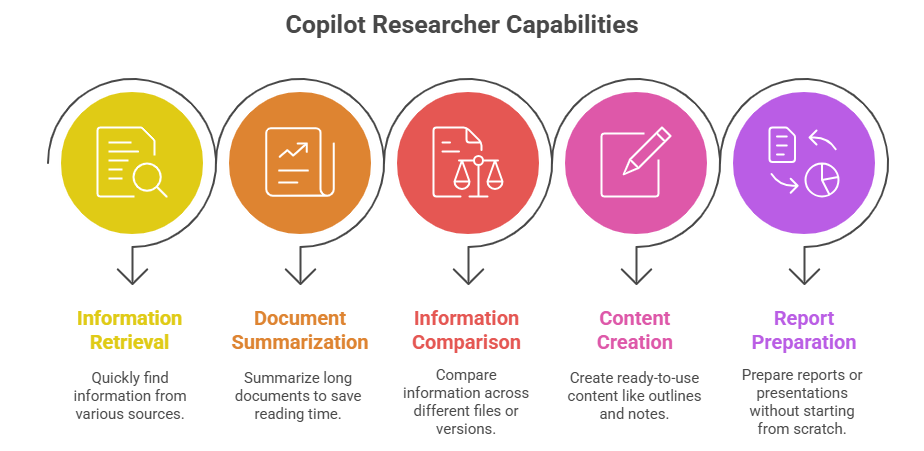
- Find information quickly from your files, emails, Teams chats, and trusted web sources
- Summarize long documents so you don’t have to read everything yourself
- Compare information across different files or versions
- Create ready‑to‑use content like outlines, research notes, and talking points
- Prepare reports or presentations without starting from scratch
Core Capabilities with Examples:
Research Any Topic > Fast
Ask Copilot anything, and it will pull together research that’s structured, credible, and relevant.
Examples:
- “Research the latest trends in digital workplace governance.”
- “Create a comparison summary between Teams meeting recordings and transcripts.”
It returns clean outlines, bullet points, or narrative summaries.
Summarize Complex Documents in Seconds
Turn a 40-page report into a one-page summary with key points and risks highlighted.
Examples:
- “Summarize this compliance policy for a non‑technical audience.”
- “Highlight any action items in this 60‑page project plan.”
Perfect for leadership updates, project decisions, or onboarding.
Compare Information Across Multiple Sources
Copilot can compare documents, emails, proposals, strategies, or datasets.
Examples:
- “Compare Proposal A and Proposal B. Where do they differ?”
- “What are the gaps between our current policy and the new draft?”
It instantly creates comparison tables, something humans usually dread doing.
Generate Ready‑To‑Use Reports
Need a research summary or briefing pack? Copilot structures the document for you.
Examples:
- Executive summaries
- Background briefs
- Market research overviews
- Topic outlines
- Strategy drafts
- Stakeholder analysis
Pull Context You Already Have, But Forgot You Had
Copilot Researcher understands your content.
It can find answers buried in:
- SharePoint libraries
- Teams channels
- OneDrive files
- Email threads
- Meeting notes
- Planner tasks
It’s brilliant for people who know the answer is “somewhere in Microsoft 365.” And even better for me who has forgotten where it is and who it was for!!
How to Use Copilot Researcher
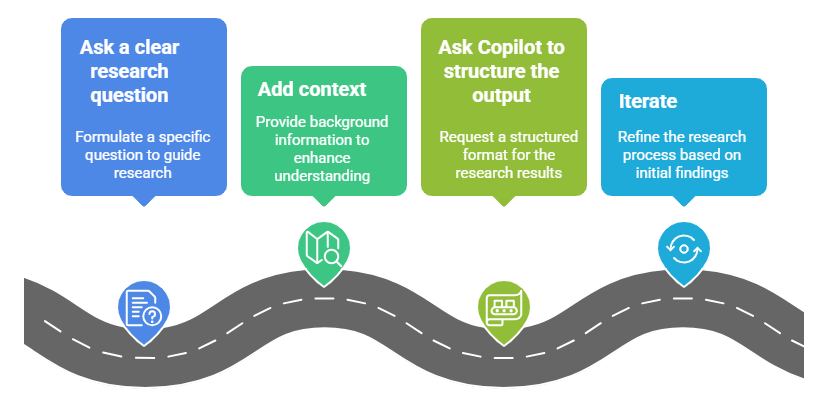
Step 1: Ask a clear research question
Start with something like:
“Research the benefits, risks, and best practices for using Generative AI in the workplace.”
Step 2: Add context
“Make it relevant to financial services in South Africa.”
Step 3: Ask Copilot to structure the output
“Create a two-page executive brief with a table of contents.”
Step 4: Iterate
Always remember: Copilot improves with conversation.
Ask follow-ups like:
“Can you expand section 2 with examples?”
“Add a risk mitigation strategy.”
“Summarize for a non‑technical audience.”
The more you refine, the better the output becomes.
Is It Safe?
Yes, Copilot Researcher only uses the data you have permission to access.
If a user cannot see it in SharePoint or Teams, Copilot cannot either.
This is why permissions and oversharing matter, refer to my blog that explains this in more detail: Oversharing in the Age of Copilot: Your Data’s Worst Enemy.
The ROI:
Copilot Researcher unlocks immediate benefits:
- Faster insights
- Higher quality decisions
- More strategic thinking
- Reduced manual research time
- Consistent reporting
- Better knowledge reuse
Most companies discover that people spend 40–60% of their time searching, summarizing, or re-creating information. Copilot flips that on its head.
Closing Thoughts
Copilot Researcher is one of the most powerful features in Microsoft 365 Copilot, even though many people don’t know about it. It helps you think more clearly, work smarter, and create well‑structured, professional content without spending hours digging through information.
It’s not just a tool that saves time; it helps you make sense of all the information coming at you every day. And in a world where we’re all overwhelmed by emails, documents, and data, having something that brings clarity is a game‑changer. Copilot Researcher finally gives us a way to cut through the noise and focus on what really matters.
In the next article we’ll take a look at the Analyst Agent in Copilot.
Resources:
- Copilot Prompt Gallery
- Microsoft 365 Copilot help & learning
- Accelerate your AI journey with our Copilot Success Kit
- Microsoft 365 Copilot Hub
- Copilot Success Kit
- Flexible Copilot plans for every organization
- Restrict discovery of SharePoint sites and content
- Address oversharing in Microsoft 365 Copilot
- Oversharing Control at Enterprise Scale | Updates for Microsoft 365 Copilot in Microsoft Purview
- Explore agents pre-built for you in Microsoft Copilot Studio
- Introducing Researcher and Analyst in Microsoft 365 Copilot
Other Copilot related blogs I’ve written:
- From Burnout to Balance: My Journey with Microsoft Copilot
- Prompt Like a Pro: Exploring the Purpose of the Copilot Prompt Gallery
- Microsoft 365 Copilot Help & Learning Portal
- The Prompt Gallery Playbook: Level Up Your Copilot Skills
- Beyond Chat: How Copilot Agents Are Transforming Work in 2026
- Copilot: Treat it like a conversation — adjust, refine, iterate!
- Saving Time Daily: 20 Things Copilot Can Already Do for You
- Copilot Chat vs Business vs Enterprise vs Studio: Clear, Simple, Decoded
- Oversharing in the Age of Copilot: Your Data’s Worst Enemy
“Build confidence, boost creativity, and let Copilot do the heavy lifting. Your journey from beginner to brilliant starts with one good prompt.”
Contact me:
Do you need help with your #Microsoft365 #Copilot journey? Contact me.
Please DO NOT contact me to publish blogs on your behalf, advertise on my site, endorse your product or solve a problem you have (that could have been solved by posting on an online forum). As part of the #Micosoft365 #Copilot #Community, we work really hard on content and support that we give back to you, for free – because we really do care. You are always welcome to leave (relevant) comments on my blogs / videos, and I’ll respond, as this way, others also get value from it.
Stay awesome, keep learning, help others.

 Tracy van der Schyff
Leave a Reply