AI is changing the way we work, but here’s the big truth: Copilot becomes far more valuable when people share what works, not when everyone figures things out alone.
That’s why creating a Copilot Community inside Viva Engage is one of the simplest, most high‑impact steps any organisation can take to speed up adoption, improve skills, and boost confidence for all employees.
Let’s walk through the why, the what, and most importantly, how to get people excited to join, learn, and share.

Why Start a Copilot Community?
Most employees learn best from each other. That’s where the real magic happens:
- Someone shares a clever Outlook prompt that saves them 15 minutes.
- Another posts a PowerPoint tip that transforms their presentations.
- Someone else asks, “Does anyone have a better way to summarise a meeting?” — and suddenly five people jump in with solutions.
A Copilot Community becomes your organisation’s informal learning hub, giving people the confidence and curiosity to try Copilot in ways they might never have explored alone. It turns AI adoption from a technical rollout… into a cultural shift.
What Is Viva Engage?
Viva Engage is Microsoft’s modern social platform for the workplace, think of it as your internal LinkedIn or community forum where people can connect, ask questions, and share knowledge openly.
Inside Viva Engage, you can create a dedicated community for Copilot where employees:
- Ask questions
- Share prompts
- Celebrate wins
- Post quick tips
- Run polls
- Share short videos or screenshots
- Learn from peers in real time
It’s lightweight, familiar, and built right into Microsoft 365, which means no new system or login needed. Learn more: Viva Engage help & learning
Benefits of a Copilot Community
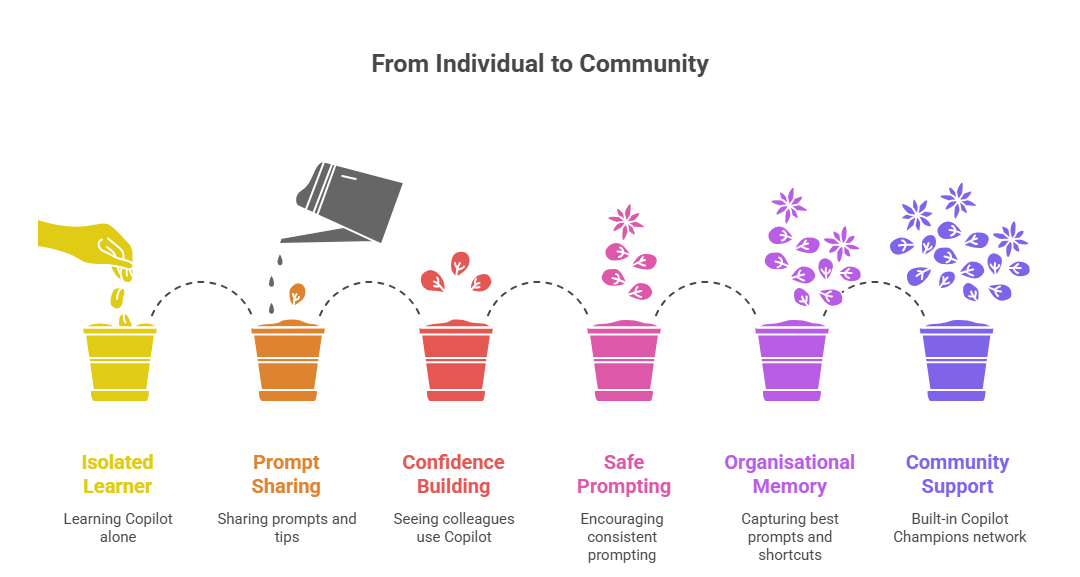
1. Faster learning for everyone
When someone shares a prompt or tip, hundreds of others can use it instantly, no classroom required.
2. Builds confidence
Seeing real colleagues use Copilot reduces fear and helps people understand what’s possible in a relatable way. 👈🏻👈🏻👈🏻👈🏻👈🏻👈🏻 THIS!!!
3. Encourages safe, consistent prompting
Sharing recommended prompts teaches good habits and reduces risky behaviours like dumping confidential data into AI tools.
4. Creates organisational “memory”
Your best prompts, shortcuts, and examples don’t get lost in chats, they’re captured in one place.
5. Supports change adoption naturally
People learn best from trusted peers. This community becomes your built‑in Copilot Champions network.
How People Can Engage in the Community
Every organisation has different personalities, the talkers, the watchers, the sharers, the problem‑solvers. Viva Engage gives everyone a space to contribute in their own way.
Here’s how your employees can participate:
For the beginners
- Ask questions
- Request help (“Does anyone have a prompt for…?”)
- React to posts to show what’s helpful
- Save prompts directly in their Copilot Library
For the confident users
- Share simple, reusable prompts
- Post quick wins with “before vs after” examples
- Share screenshots or short videos
- Recommend safe prompt patterns
- Help answer questions from new members
For the power users and champions
- Create “prompt of the week” posts
- Run small challenges (e.g., fastest inbox clean‑up)
- Create templates for others
- Curate the top prompts into a pinned post
- Help moderate and keep conversations safe and on‑topic
How to Encourage Sharing
Not everyone is naturally comfortable posting publicly at work. But with the right structure, engagement will grow naturally.
Here’s what works exceptionally well:
1. Seed the community with a few great starter posts
Examples:
- “My best 5‑minute time saver with Copilot this week”
- “A prompt you can reuse every morning to prioritise your emails”
- “How I used Copilot to summarise a 50-page document in minutes”
2. Use simple, fun weekly themes
- Tip Tuesday
- Prompt Swap Thursday
- Five-Minute Friday Wins
Themes make posting feel natural, not intimidating.
3. Run small challenges
People love these!
Try: “Share a prompt that saves you 10 minutes — the top liked post wins a coffee voucher.”
4. Praise early and often
A quick “Great prompt!” or “Love this idea!” encourages others to join in.
5. Share real stories
“When I first learned this Copilot trick… it saved me an hour.”
Stories make AI feel human and relatable.
6. Sponsor involvement
A short welcome message from a leader immediately boosts trust and visibility.
7. Keep it friendly, inclusive and judgment‑free
Remind people: there are no silly questions when learning something new.
Final Thoughts
A Copilot Community isn’t just another space in Viva Engage, it’s a powerful catalyst for culture change. It shifts AI from a “scary new thing” to something social, practical, and enjoyable.
When employees learn from each other, experiment together, and celebrate small wins, Copilot becomes part of everyday work… not a tool only a few people use.
Microsoft Resources:
- Copilot Prompt Gallery
- Microsoft 365 Copilot help & learning
- Accelerate your AI journey with our Copilot Success Kit
- Microsoft 365 Copilot Hub
- Copilot Success Kit
- Flexible Copilot plans for every organization
- Restrict discovery of SharePoint sites and content
- Address oversharing in Microsoft 365 Copilot
- Oversharing Control at Enterprise Scale | Updates for Microsoft 365 Copilot in Microsoft Purview
- Explore agents pre-built for you in Microsoft Copilot Studio
- Introducing Researcher and Analyst in Microsoft 365 Copilot
- Welcome to Copilot in Word
- Get started with Copilot in Excel
Other Copilot related blogs I’ve written:
- From Burnout to Balance: My Journey with Microsoft Copilot
- Prompt Like a Pro: Exploring the Purpose of the Copilot Prompt Gallery
- Microsoft 365 Copilot Help & Learning Portal
- The Prompt Gallery Playbook: Level Up Your Copilot Skills
- Beyond Chat: How Copilot Agents Are Transforming Work in 2026
- Copilot: Treat it like a conversation — adjust, refine, iterate!
- Saving Time Daily: 20 Things Copilot Can Already Do for You
- Copilot Chat vs Business vs Enterprise vs Studio: Clear, Simple, Decoded
- Oversharing in the Age of Copilot: Your Data’s Worst Enemy
- How to Use Copilot Researcher for Faster, Better Decision-Making
- Meet Copilot Analyst: Your New Data Scientist on Demand
- Your Copilot Crash Course: 10 Essential Blogs for Every Employee
- Write Smarter in Word with Copilot: Practical Prompts, Safer Content, Better Outcomes
- From Numbers to Insights: Copilot in Excel for Everyone
- Your New Presentation Partner: Discover Copilot for PowerPoint
- Master Your Inbox with AI: Copilot Tips Anyone Can Use
- Copilot & Digital Fluency Across Office: The Best of Excel, Word, Outlook & PowerPoint in One Guide
- The ‘Prompt Library’ Anti‑Pattern: Why You Should Build Decision Trees Instead
- Steal Your Lunch Break Back with Copilot
“Build confidence, boost creativity, and let Copilot do the heavy lifting. Your journey from beginner to brilliant starts with one good prompt.”
Spoiler Alert!! I use Copilot to create my Blog Thumbnails and help fact check my articles / shorten / summarise paragraphs where needed. I also use Napkin.AI to create any infographics I use. Of course I can create my own images, and I ROCK at PowerPoint, but with Copilot I can do SO MUCH MORE, SO MUCH FASTER! I’ve always wanted an assistant, now I do. #WinningAtLife
Contact me:
Do you need help with your #Microsoft365 #Copilot journey? Contact me.
Please DO NOT contact me to publish blogs on your behalf, advertise on my site, endorse your product or solve a problem you have (that could have been solved by posting on an online forum). As part of the #Micosoft365 #Copilot #Community, we work really hard on content and support that we give back to you, for free – because we really do care. You are always welcome to leave (relevant) comments on my blogs / videos, and I’ll respond, as this way, others also get value from it.
Stay awesome, keep learning, help others.

 Tracy van der Schyff
Leave a Reply