Project management has never been short on tools, but it has often been short on time. With #Microsoft365 and #Copilot, project managers are finally seeing meaningful relief from admin‑heavy work: usable meeting summaries, status updates that don’t start from scratch, and insights surfaced faster than ever before.
Copilot doesn’t replace the project manager. It removes the friction.

A personal note to project managers and aspiring citizen developers:
I’m writing this post because I’ve seen too many capable, curious people hit this moment and immediately assume they’ve done something wrong, or that Copilot has “failed.” That urge to want more, to expect prioritisation, logic, and action, is not a mistake; it’s a natural progression. Crossing that line simply means you’ve outgrown basic usage and started thinking like a problem‑solver. Be kind to yourself at that point. Don’t blame the tool, and don’t blame your own skills. Pause, learn, and decide intentionally what comes next. This journey isn’t about rushing to build everything; it’s about understanding what’s possible and growing into it at your own pace.
The Early Copilot Wins Feel Almost Effortless
In the early days, Copilot delivers quick, tangible value. Ask it to summarise a meeting, draft a status report, or extract risks from documents, and the results are immediate. Tasks that used to take an hour suddenly take minutes.
For most PMs, this alone justifies adoption. Less admin. More focus on delivery.
And Then the Questions Start Changing
Once Copilot becomes a habit, the questions naturally become more ambitious:
- Can it prioritise my risks?
- Why can’t it flag overdue actions automatically?
- Can it filter or group items in my Microsoft List the way I want?
This is the moment almost every project manager eventually reaches — the Copilot line.
What Is the “Copilot Line”?
The Copilot line is the shift from asking Copilot to summarise and explain, to expecting it to decide and act.
It’s an important moment, and a healthy one. It means teams have moved beyond curiosity and into real operational use. This isn’t Copilot falling short. It’s Copilot being used seriously.
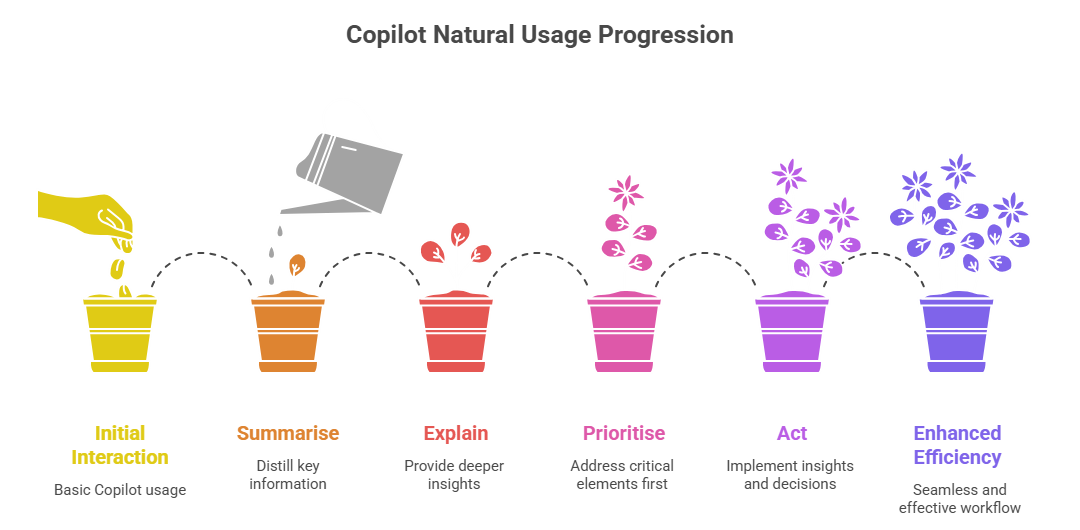
What Copilot Does Brilliantly (Out of the Box)
Copilot excels at:
- Summarising meetings and conversations
- Drafting content and reports
- Explaining data and trends
- Connecting information across Microsoft 365
These capabilities alone fundamentally improve how projects run. What Copilot deliberately avoids is applying complex business logic or running automated workflows without explicit instruction.
Why That Boundary Exists
Copilot not automatically prioritising risks or taking action isn’t a limitation, it’s a safeguard. Projects involve nuance, judgment, and context. Those decisions still belong with people, processes, and governance.
That boundary protects organisations from unintended outcomes while still delivering intelligent assistance.
When Agents Enter the Conversation
As soon as teams rely on filtered views, prioritisation rules, or repeatable decisions, especially in tools like Microsoft Lists, the conversation naturally shifts.
Suddenly, words like Copilot Studio, custom agents, licensing, and governance surface. Often earlier than expected.
You Don’t Have to Be an Agent‑Builder (Yet)
This is where many people pause, and that’s completely okay. I’m not an agent‑builder either. I’m learning in the open, exploring what’s possible, and being honest about where my skills are today.
You don’t need agents to get value from Copilot. Curiosity always comes before capability.
Not Everything Needs Automation
One of the biggest mistakes teams can make is assuming every process must be automated. Some workflows benefit from intelligence. Others benefit from clarity and simplicity.
Copilot delivers enormous value when used intentionally, even before agents come into play.
Why I See the Copilot Line as a Good Thing
Hitting this line means the novelty has worn off. It marks the shift from “What can Copilot do?” to “What should it do — and how responsibly?”
That’s where mature, modern project management begins.
What Comes Next
In upcoming posts, I’ll explore what actually happens beyond the Copilot line, including what building agents really involves, how licensing and consumption work, and what governance should look like before scaling beyond experimentation. I’ll also create follow-up, more detailed blogs with custom videos on how to create the Project Management Team & Channels plus preferred configuration and settings and then how to create that Microsoft List for your Risk & Issue Register (and include some cool rules you setup to get notified on certain statuses).
For now, if Copilot feels powerful but not quite enough, you’re exactly where most modern project managers eventually end up, and that’s a very good place to be.
Author’s note: With over 1 000 blogs published, there’s simply not enough time (or wine 🍷) to retroactively update older posts every time features change. I always try to clearly state which version I’m using, so you can easily research what may be new or different from the images or videos I’ve shared. All Copilot‑related blogs I write are based on the Microsoft 365 Copilot for Business add‑on license that I currently use. Where applicable, it will state whether the action / prompt is possible with the Copilot Chat included in your standard Microsoft 365 license.
Microsoft Resources:
- Copilot Prompt Gallery
- Microsoft 365 Copilot help & learning
- Accelerate your AI journey with our Copilot Success Kit
- Microsoft 365 Copilot Hub
- Copilot Success Kit
- Flexible Copilot plans for every organization
- Restrict discovery of SharePoint sites and content
- Address oversharing in Microsoft 365 Copilot
- Oversharing Control at Enterprise Scale | Updates for Microsoft 365 Copilot in Microsoft Purview
- Explore agents pre-built for you in Microsoft Copilot Studio
- Introducing Researcher and Analyst in Microsoft 365 Copilot
- Welcome to Copilot in Word
- Get started with Copilot in Excel
- Accelerate your AI journey with our Copilot Success Kit
- Share your best prompts
- Boost Your Copilot Collaboration with Reusable Prompt Files
- New Copilot Prompt Gallery helps you discover, save, and share your favorite prompts
- Set up a Channel Agent for Microsoft Teams
- Archive or restore a team in Microsoft Teams
- Microsoft Lists Adoption Center
- Microsoft Lists help & learning
- Microsoft Lists adoption resources and videos
Other Copilot related blogs I’ve written:
Copilot Adoption, Tech Readiness & Licensing:
- From Burnout to Balance: My Journey with Microsoft Copilot
- Microsoft 365 Copilot Help & Learning Portal
- The Prompt Gallery Playbook: Level Up Your Copilot Skills
- Beyond Chat: How Copilot Agents Are Transforming Work in 2026
- Copilot Chat vs Business vs Enterprise vs Studio: Clear, Simple, Decoded
- Oversharing in the Age of Copilot: Your Data’s Worst Enemy
- Start a Copilot Community with Viva Engage: Share Tips, Tricks, and Prompts that Stick
- Beyond the Bot: A No‑Drama Playbook for Copilot Adoption
Copilot Prompts and Learning:
- Prompt Like a Pro: Exploring the Purpose of the Copilot Prompt Gallery
- Copilot: Treat it like a conversation — adjust, refine, iterate!
- Saving Time Daily: 20 Things Copilot Can Already Do for You
- How to Use Copilot Researcher for Faster, Better Decision-Making
- Meet Copilot Analyst: Your New Data Scientist on Demand
- Your Copilot Crash Course: 10 Essential Blogs for Every Employee
- Write Smarter in Word with Copilot: Practical Prompts, Safer Content, Better Outcomes
- From Numbers to Insights: Copilot in Excel for Everyone
- Your New Presentation Partner: Discover Copilot for PowerPoint
- Master Your Inbox with AI: Copilot Tips Anyone Can Use
- Copilot & Digital Fluency Across Office: The Best of Excel, Word, Outlook & PowerPoint in One Guide
- The ‘Prompt Library’ Anti‑Pattern: Why You Should Build Decision Trees Instead
- Steal Your Lunch Break Back with Copilot
- Stop Re‑Prompting Copilot. Reuse What Works
Project Management:
- Using Microsoft Teams + Copilot for Project Management
- Turn Chaos into Clarity: Build a Simple Risk & Issue Register with Teams + Copilot
- Project Management with Copilot: Turning Your Risk & Issue Register into Actionable Insights
- Using Microsoft Copilot with Microsoft Lists: Capabilities, Limits, and Licensing Explained
- Top 10 Copilot prompts for Project Managers
- Modern Project Management: Mapping Activities to Microsoft 365, Copilot & AI Agents
“Build confidence, boost creativity, and let Copilot do the heavy lifting. Your journey from beginner to brilliant starts with one good prompt. SuperZero to SuperHero in no time!”
Spoiler Alert!! I use Copilot to create my Blog Thumbnails and help fact check my articles / shorten / summarise paragraphs where needed. Where applicable, I also use Napkin.AI to create any infographics I use. Of course I can create my own images, and I ROCK at PowerPoint, but with Copilot I can do SO MUCH MORE, SO MUCH FASTER! I’ve always wanted an assistant, now I do. #WinningAtLife
Contact me:
Do you need help with your #Microsoft365 #Copilot journey? Contact me.
Please DO NOT contact me to publish blogs on your behalf, advertise on my site, endorse your product or solve a problem you have (that could have been solved by posting on an online forum). As part of the #Micosoft365 #Copilot #Community, we work really hard on content and support that we give back to you, for free – because we really do care. You are always welcome to leave (relevant) comments on my blogs / videos, and I’ll respond, as this way, others also get value from it.
Stay awesome, keep learning, help others.

 Tracy van der Schyff
Leave a Reply