We’re hearing more and more about AI being used to scam, manipulate, and deceive. Fake emails. Fake voices. Fake offers that look just real enough to trick you. And it’s scary.
But here’s the thing most people are missing… The same AI that threatens you can also protect you.

Don’t avoid AI, rather use it wisely:
A lot of people think the safest approach is to stay away from AI completely. But that’s no longer realistic. AI is already part of our daily lives, in our phones, our inboxes, our social media, our work.
(And yes, I TOTALLY used Copilot to help me write this blog. I was inspired on a call with a client, while showing them how to use Copilot to find 20 things they could teach their children to protect themselves, and then realized I should put it out there, because many people simply don’t think that far. So “thank you Copilot”, for helping me reach and help people, FASTER!!! ❤️. I had the empathy and idea, I wrote 80% of it > Copilot helped me rewrite it, I reviewed it, I published it.)
So, the real question becomes: “Are you facing it alone… or are you using it to your advantage?”
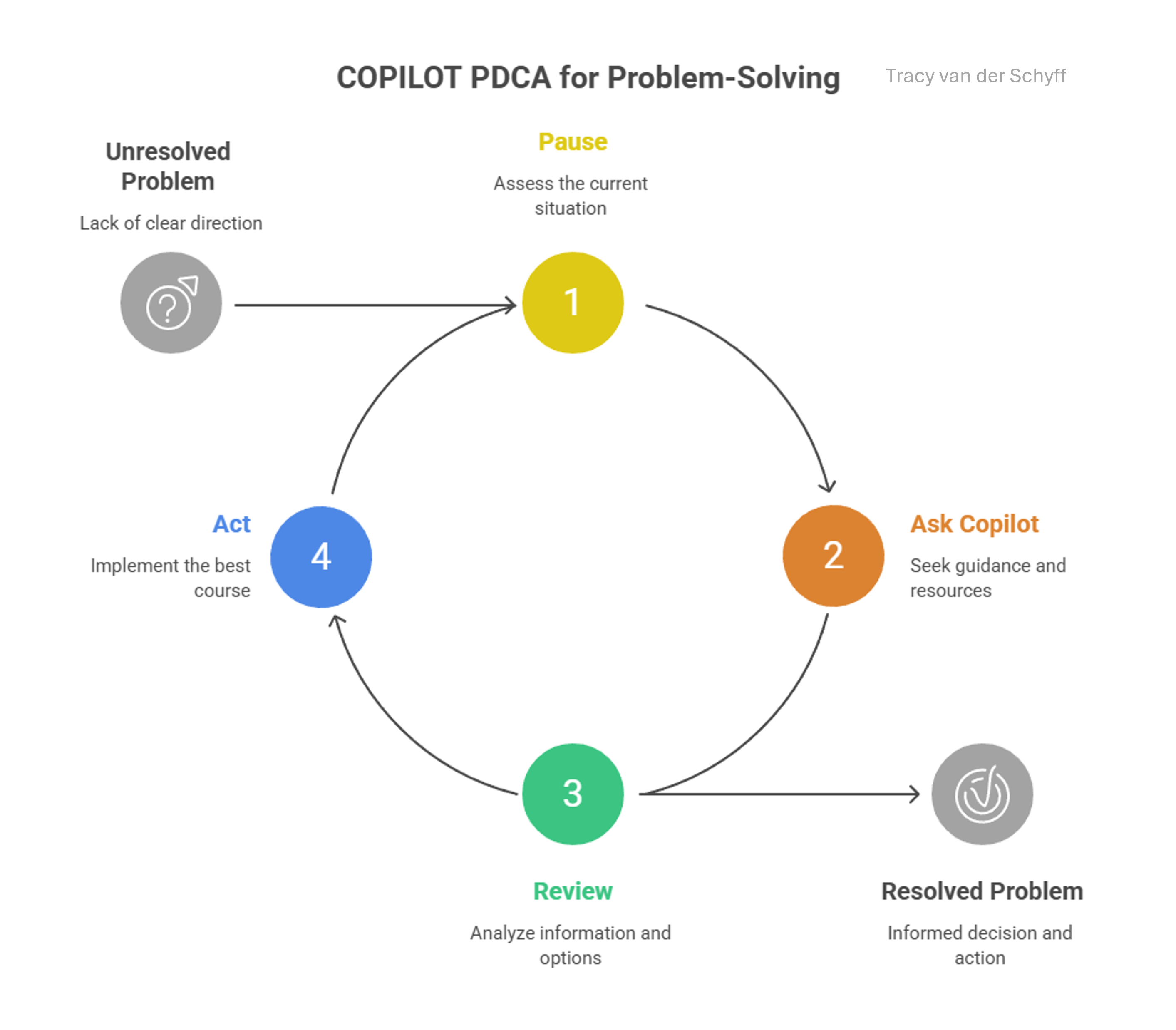
Your new habit: Pause. Ask. Review. Act.:
Before you trust anything online:
- Pause
- Ask Copilot
- Review
- Then act
It’s that simple.
Real-life ways AI can protect you:
You don’t need to be an expert. You just need to ask.
- Got a strange SMS? → “Is this message a scam? Explain why.”
- Email feels “off”? → “What red flags are in this email?”
- Too-good-to-be-true deal? → “Is this company legitimate? What should I check?”
- Suspicious link? → “What are the risks if I click this?”
Within seconds, you have a second opinion — one that isn’t emotional, rushed, or distracted. “Before you react… ask Copilot.”
Family protection angle:
- Teach kids: “Don’t trust links, ask Copilot first”
- Protect elderly parents from scams
- Use Copilot as a “second opinion brain” before clicking, paying, sharing
“You don’t need to be tech-savvy to be safe, you just need to ask smarter questions.”
The “Pause → Ask → Review → Act” rule:
Before you trust anything digital:
- Pause
- Ask Copilot
- Review
- Then act
Change Fear into Empowerment
| Old mindset | New mindset |
|---|---|
| “AI is dangerous” | “AI can protect me” |
| “I don’t understand scams” | “I can validate in seconds” |
| “I might fall for this” | “I have a co-pilot checking with me” |
Accessibility
“AI safety is no longer reserved for experts, it’s available to anyone willing to ask.”
- Don’t have a company Microsoft 365 account with Copilot? No problem.
- Don’t have a paid Copilot license? Still no problem.
- There’s a free consumer version of Copilot available to anyone with internet access: 👉 Microsoft Copilot: Your AI companion
Important: Use the consumer version for personal use and everyday decision-making, not for sensitive company information.
“Your safest habit? Curiosity before action.”
Closing:
I’ve realised that I’m so much more than my job. And so are you. Let Copilot help you be a better human, a better friend, partner, parent. Use it to give yourself back something we’re all running short on: time.
– Time to breathe.
– Time to be present.
– Time to actually appreciate life.
In this video Digital transformation: Are you ready for exponential change? futurist Gerd Leonhard explains it so well (and believe it or not, this was published 10 years ago, nearly to the day, on the 11th of May 2016 – still SO relevant). “Anything that cannot be digitized or automated, will become extremely valuable.” And if you don’t know this yet, we are talking about YOU.
I’m excited to do this with you. And spoiler alert, Nistasja van Deventer has some incredible insights to share on this topic as well… so watch this space.
Stay awesome. Chat soon. ❤️🤘
Author’s note: With over 1 000 blogs published, there’s simply not enough time (or wine 🍷) to retroactively update older posts every time features change. I always try to clearly state which version I’m using, so you can easily research what may be new or different from the images or videos I’ve shared. All Copilot‑related blogs I write are based on the Microsoft 365 Copilot for Business add‑on license that I currently use (most prompts are available with the “free included Copilot” which I regularly test in). Where applicable, it will state whether the action / prompt is possible with the Copilot Chat included in your standard Microsoft 365 license.
Microsoft Resources:
- Copilot Prompt Gallery
- Microsoft 365 Copilot help & learning
- Accelerate your AI journey with our Copilot Success Kit
- Microsoft 365 Copilot Hub
- Copilot Success Kit
- Flexible Copilot plans for every organization
- Restrict discovery of SharePoint sites and content
- Address oversharing in Microsoft 365 Copilot
- Oversharing Control at Enterprise Scale | Updates for Microsoft 365 Copilot in Microsoft Purview
- Explore agents pre-built for you in Microsoft Copilot Studio
- Introducing Researcher and Analyst in Microsoft 365 Copilot
- Welcome to Copilot in Word
- Get started with Copilot in Excel
- Accelerate your AI journey with our Copilot Success Kit
- Share your best prompts
- Boost Your Copilot Collaboration with Reusable Prompt Files
- New Copilot Prompt Gallery helps you discover, save, and share your favorite prompts
- Set up a Channel Agent for Microsoft Teams
- Archive or restore a team in Microsoft Teams
- Microsoft Lists Adoption Center
- Microsoft Lists help & learning
- Microsoft Lists adoption resources and videos
Other Copilot related blogs I’ve written:
Copilot Adoption, Tech Readiness & Licensing:
- From Burnout to Balance: My Journey with Microsoft Copilot
- Microsoft 365 Copilot Help & Learning Portal
- The Prompt Gallery Playbook: Level Up Your Copilot Skills
- Beyond Chat: How Copilot Agents Are Transforming Work in 2026
- Copilot Chat vs Business vs Enterprise vs Studio: Clear, Simple, Decoded
- Oversharing in the Age of Copilot: Your Data’s Worst Enemy
- Start a Copilot Community with Viva Engage: Share Tips, Tricks, and Prompts that Stick
- Beyond the Bot: A No‑Drama Playbook for Copilot Adoption
Copilot Prompts and Learning:
- Prompt Like a Pro: Exploring the Purpose of the Copilot Prompt Gallery
- Copilot: Treat it like a conversation — adjust, refine, iterate!
- Saving Time Daily: 20 Things Copilot Can Already Do for You
- How to Use Copilot Researcher for Faster, Better Decision-Making
- Meet Copilot Analyst: Your New Data Scientist on Demand
- Your Copilot Crash Course: 10 Essential Blogs for Every Employee
- Write Smarter in Word with Copilot: Practical Prompts, Safer Content, Better Outcomes
- From Numbers to Insights: Copilot in Excel for Everyone
- Your New Presentation Partner: Discover Copilot for PowerPoint
- Master Your Inbox with AI: Copilot Tips Anyone Can Use
- Copilot & Digital Fluency Across Office: The Best of Excel, Word, Outlook & PowerPoint in One Guide
- The ‘Prompt Library’ Anti‑Pattern: Why You Should Build Decision Trees Instead
- Steal Your Lunch Break Back with Copilot
- Stop Re‑Prompting Copilot. Reuse What Works
- Today’s Broadcast Is Interrupted… by Wine (and Copilot)
“Build confidence, boost creativity, and let Copilot do the heavy lifting. Your journey from beginner to brilliant starts with one good prompt. SuperZero to SuperHero in no time!” Join our Copilot Zero to Hero program here: Copilot: Zero to Hero: AI Supercharged #LearningThroughSharing #Community #Microsoft
Contact me:
Do you need help with your #Microsoft365 #Copilot journey? Contact me.
Please DO NOT contact me to publish blogs on your behalf, advertise on my site, endorse your product or solve a problem you have (that could have been solved by posting on an online forum). As part of the #Micosoft365 #Copilot #Community, we work really hard on content and support that we give back to you, for free – because we really do care. You are always welcome to leave (relevant) comments on my blogs / videos, and I’ll respond, as this way, others also get value from it.
Stay awesome, keep learning, help others.


Leave a Reply